Chameleon Plone Skin Customization
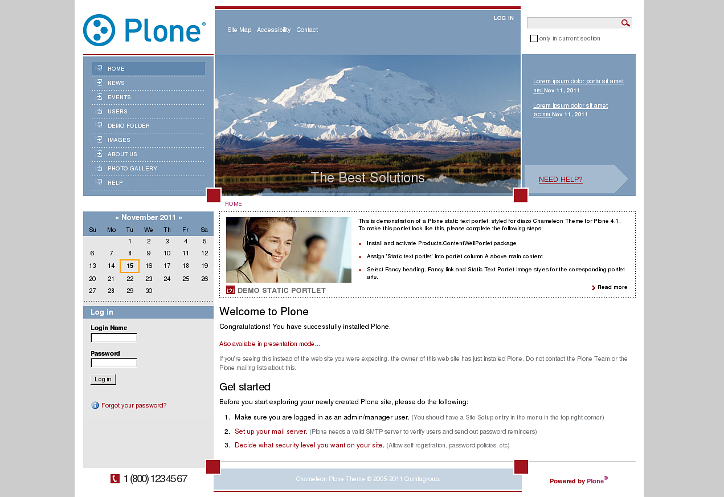
Imagine we have a new Plone 3.0 site with Quintagroup's Plone Chameleon Skin installed. Front page will approximately look the following way,
where:
1 - Company Logo that may be replaced with yours
2 - Global Navigation
3 - Chameleon skin top default image, can be different for different folders
4 - Portal Slogan, can be changed to your own.
5 - Portal Help sign in the top right area, can be removed from the root of the site
6 - two Content Portlets.
7 - Footer, subdivided into three parts
All these site parts can be customized to meet your needs.
This Plone tutorial consists of several parts, in which you will find explanations about how to customize Chameleon Plone Skin to your needs:
Part 1 - How to replace default company logo with a new one
Part 2 - How to change global navigation width
Part 3 - How to deal with top image
Part 4 - How to replace default company slogan with a new one
Part 5 - How to remove help sign
Part 6 - How to deal with content portlets
Part 7 - How to customize footer
Part 8 - How to change skin color
Part 9 - How to change Chameleon Skin column width
All the changes in Chameleon Plone Skin can be done in two ways: through Zope Management Interface and through File System.
1) Zope Management Interface (ZMI)
ZMI can be reached by adding /manage to site URL.
In the left navigation menu select portal_skins.
Then select qploneskinchameleon
among right portal_skins
content items. This is a folder
where all the following changes will take place.
2) File System
To get to File System in Windows use WinSCP program, in Linux - with Krusader program. Login to your Quintagroup Plone Hosting account. (In case you do not know how to connect to your account, follow description from Plone Products Installation in Linux and How To Install Plone Products (in Windows) up to the moment you get to Products folder.Find qPloneSkinChameleon folder among other Plone Products:

Select skins folder:

It consists of qploneskinchameleon folder:

This is a folder where all the following changes will take place.